
Getting Randall County Court Records
Start with the official Randall County Services page. It keeps court records separate from recorded property documents and e-filing. From there, follow the link to the Randall Tyler public portal. A cause number is the best search key. If you lack one, a name, filing year, case type, and court can narrow the field. The public interface may not render every control. So confirm its buttons, fees, and completeness before trusting a result.
When online access stalls, call or visit the clerk who holds the file. You can also mail a narrow written request. The District Clerk also provides a Justice Center drop box for permitted business. Any request should state the cause number and the full case style. Add the court, the precise document, its approximate date, the format you want, whether certification is needed, and how you want delivery. Never mail cash.
- Identify the court and case category.
- Check the county portal with a cause number or name.
- Try re:SearchTX for a statewide search.
- Call or visit the clerk if the record is missing.
- Mail a precise request after confirming fees.
Randall County Record Custodians
Randall County splits its records between two clerks. The District Clerk holds district criminal, civil, and family files for the 47th, 181st, and 251st District Courts. That office is the first stop for them. For county-court, probate, and related records, the separate route is the County Clerk. County Courts at Law No. 1 and No. 2 each have their own coordinators. Each court also has its own suite.
Justice-court records stay with the responsible precinct. The current directory lists JP 1, JP 4, and JP 4A. Municipal citations belong to Amarillo or Canyon. Federal files go through PACER or the federal clerk. Name the court before you search, and you will avoid a false "not found" answer.
| Record | Custodian | First route |
|---|---|---|
| District case | District Clerk | Portal or Suite 110 |
| County court or probate | County Clerk or CCL | Suite 101 or named CCL |
| JP case | JP 1, 4, or 4A | Issuing precinct |
| City citation | Amarillo or Canyon | Issuing city |
Randall County Court Record Types
A docket sheet is a timeline built in the clerk's case system. It can list filings, settings, rulings, and closing events. It is not the whole file. A filed document is the real thing: the petition, indictment, motion, response, order, judgment, plea paper, or exhibit an entry names. A calendar or plea-negotiation notice covers one event only, so it is never the complete Randall County court record.
Other products carry different custodians and fees. A certified copy is a clerk-attested reproduction. An exemplified record adds further authentication where offered. A transcript comes from the court reporter. An administrative court record may follow Texas Rule of Judicial Administration 12 rather than a case-copy request.
- Docket sheet or event history
- Filed pleading, motion, or response
- Signed order or final judgment
- Certified or exemplified copy
- Transcript or record of proceedings
Randall County Portal Limits
Randall County links Tyler as its court-record gateway. The Office of Court Administration names Odyssey as the District Clerk's case system. Neither fact guarantees that every Randall County court record image appears online. Public display can run narrower than the clerk file itself. A filing may still await acceptance. An older document may never have been digitized, or a security setting may hide an image while the event stays visible.
The county Services entry point shows why court files, recorded deeds, and eFileTexas remain three separate routes. Check it before assuming one portal covers all three.

A missing result calls for a clerk check, not the conclusion that no file exists. First recheck the spelling, court, case type, and year.
Portal result: Treat an index as a locator. The filed order or certified clerk copy controls when the exact disposition matters.
Inside a Randall County Court Record
The local Tyler civil detail screen has no verified public layout. So no exact set of on-screen fields can be promised. The fields a docket lookup should be checked against each answer a different question. A filing date is not proof of service. A setting is not a judgment. A status label never replaces a signed order. The entry itself must be read that way.
| Cause number | The court identifier, shown as a court-assigned cause number. |
|---|---|
| Case style | Party labels or caption. |
| Court and category | The district, CCL, JP, or city court and case type. |
| Event history | Filings, hearings, resets, orders, and disposition entries. |
| Documents | Public filing titles and dates; an image may be restricted. |
| Disposition | A label to confirm against the signed order. |
Want just the timeline? Ask for the "docket sheet or docket-event history," then order the documents that matter. That request is clearer than asking for an undefined complete file.
re:SearchTX for Randall Records
re:SearchTX offers a second route. It helps when the county portal fails or the court is unclear. Its guide describes Cases, Filings, Text, and Hearings options. It also covers a keyword bar, filters, detail links, exports, and saved searches. Sign-in uses eFileTexas credentials, or you can register. Coverage still depends on integration, date, document type, and access settings.
The statewide portal source illustrates this account-based route.
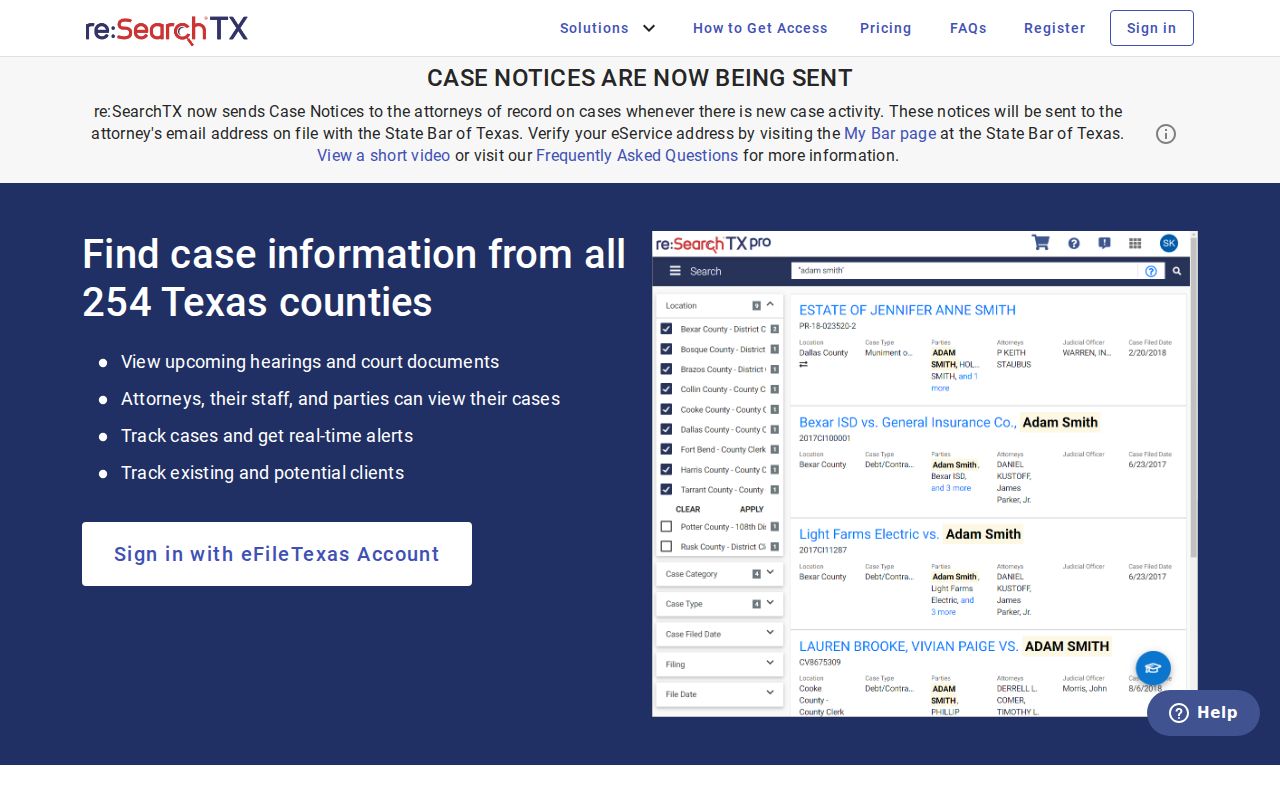
Treat a result there as a pointer: use it to identify the cause number and court. The Randall County clerk still controls corrections and certification.
Fees and Certified Copies
An ordinary copy just reproduces a public document. A certified copy adds the clerk's attestation. Ask which options exist: paper, electronic certification, or exemplification. County pages post no single certified-copy price, and charges vary by clerk, document, page count, delivery, and service.
The District Clerk lists a $5 office research fee. That charge is not automatically a copy fee. re:SearchTX materials describe public electronic documents at $0.10 per page with a $1 minimum under the stated policy, though the current checkout terms must be confirmed.
| Item | Amount | Confirm |
|---|---|---|
| District Clerk office research | $5 | Whether it applies |
| Plain copy | Varies | Page and delivery fee |
| Certified copy | Varies | Certification fee |
| re:SearchTX document | $0.10/page, $1 minimum stated | Current checkout |
Randall County District Clerk
2309 Russell Long Blvd., Suite 110
Canyon, TX 79015-1096
806-468-5600
Randall County Clerk
2309 Russell Long Blvd., Suite 101
Canyon, TX 79015
806-468-5505
Precise Randall County Record Requests
Give the clerk something narrow to work with. A precise request helps the Randall County clerk pull the right court record. It also helps the clerk quote the right fee. Include the cause number, the court, the case style, and the exact document you want. Add an approximate filing date. Say whether you need an ordinary copy or a certified one, how many copies, and whether you prefer pickup, mail, or an electronic route if one is offered.
No cause number? Then supply the full case style. Add the filing year, the case category, and the likely court. Never email private identifiers unless the clerk asks for them over a secure channel. A failed search may simply mean the case sits somewhere else. So check municipal, JP, federal, and other-county systems before giving up. Ask the clerk too whether the file is not yet indexed or is restricted.
Note: A portal outage or a missing PDF is an access problem. It is not proof that the official Randall County court record fails to exist.
Sealed Records and Public Access
Texas court records are open in most cases, but several limits apply. Statutes and court rules control who may see what. So do protective orders, redaction rules, and sealing orders. Texas Rule of Civil Procedure 76a creates a presumption of openness for the civil records it covers. A judge must make findings before sealing them. That presumption has limits, though. It does not force every family attachment into public view.
Certain material may be withheld outright. Juvenile, adoption, mental-health, expunged, nondisclosed, and sealed records all fall in that group. Randall County's October 2025 family standing order directs sealing of certain birth-certificate proof in covered cases. So a docket entry can stay visible even while its attachment stays closed.
Key access rules:
Texas judiciary open-records policy explains the Rule 12 route.
Texas Government Code Chapter 552 governs many county administrative records, not every judicial case file.
Randall PIA or Court Record
The Texas Public Information Act will not replace the court-file process. County administrative records include budgets, policies, meeting material, and department files. For those, use the Randall County PIA page. That page offers an online form. You can also email Publicinfo@randallcounty.gov or mail a request to Suite 120 at the Justice Center.
A pleading, docket, order, or judgment is a different matter. Contact the clerk of the court and ask which procedure applies. Judicial records may fall under Texas Rule of Judicial Administration 12 or another rule. Neither route defeats a sealing order or juvenile limits.
Randall County Record Boundaries
Not every document is a court record, and mixing them up wastes time. Court dockets, recorded property documents, driving histories, jail calendars, and federal cases are separate things. A jail plea list is one setting notice, not a full criminal file. A municipal payment screen shows a city citation transaction, not a district case. A deed search never returns pleadings or court orders.
A blank result usually points to the wrong custodian. The record may sit with a city court. It may sit with the issuing JP, the County Clerk, the District Clerk, or PACER. Pick based on where the case was filed, not where a party lives. The Randall County case lookup process can identify the underlying court. Do that before you request a copy.
| Item | Not the same as |
|---|---|
| Court docket | Recorded deed search |
| PNC calendar | Complete criminal file |
| City citation payment | District docket |
| DPS driving history | Traffic court file |
Verify Randall County Court Records
The clerk's filed record always controls. Docket data can lag, and it can be amended, redacted, or simply incomplete. A disposed label deserves a check against the signed order. A hearing date can change after a portal refresh. Certified copies are different. They must come from the office that keeps the original file.
Check first with the originating clerk. Confirm the cause number, court, event date, document date, and disposition. Do that before relying on any Randall County court record. Ask about current fees and delivery options while you are at it. If no public image appears, ask whether inspection or a redacted copy is available.